Theme guide
Play
Images are examples only. Download the app to study the full theme with English as your guide.
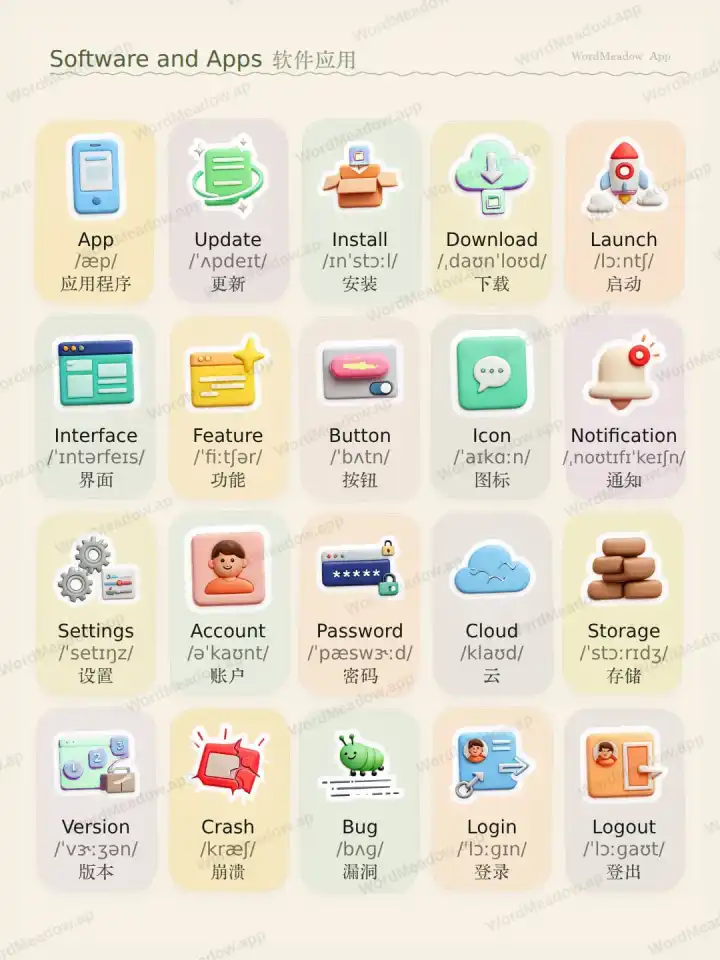
Theme video
软件应用 video
Watch this theme card with English guidance and Simplified Chinese vocabulary.Vocabulary list
Browse words, pronunciation, translations, and example sentences.应用程序
App
这个应用程序帮助我记录阅读习惯。This app helps me track my reading habits.
更新
Update
请把这个应用更新到最新版本。Please update the app to the latest version.
安装
Install
我需要在上课前安装这个新应用。I need to install the new app before class.
下载
Download
你可以从官方网站下载这个文件。You can download the file from the official website.
启动
Launch
我点击图标启动这款应用。The team will launch the app next week.
界面
Interface
新的界面在手机上更容易使用。The new interface is easier to use on mobile.
功能
Feature
这个功能可以让用户保存收藏内容。This feature lets users save their favorite items.
按钮
Button
轻点按钮继续。Tap the button to continue.
图标
Icon
这个应用用一个简洁的图标表示菜单。The app uses a simple icon for the menu.
通知
Notification
我在开会时关闭了通知。I turned off notifications during the meeting.
设置
Settings
登录前先检查一下设置。Check the settings before you sign in.
账户
Account
创建账户后,你的数据就能在不同设备间同步。Create an account to sync your data across devices.
密码
Password
不要把密码告诉任何人。Never share your password with anyone.
云
Cloud
你的照片会自动备份到云端。Your photos are backed up to the cloud automatically.
存储
Storage
我的手机存储空间几乎满了。My phone is almost out of storage.
版本
Version
我们在最新版本里修复了这个问题。We fixed the issue in the latest version.
崩溃
Crash
如果打开的文件太多,这个应用可能会崩溃。The app may crash if too many files are open.
漏洞
Bug
开发人员正在修复这个漏洞。The developers are working to fix the bug.
登录
Login
使用你的邮箱登录这个网站。Use your email to log in to the website.
登出
Logout
使用共享电脑后一定要登出。Always log out after using a shared computer.
Get the WordMeadow app for the full study flow
More themes, tap-to-listen practice, saved words, short readings, and spelling exercises come together in the app.
More themesListen and repeatSaved reviewSpelling practice
 Open on the App Store
Android is coming
Use the iOS version for now. The Android download entry will appear here when it is ready.